TradingView Review for Beginners: Worth It?
Open TradingView for the first time and it can feel like walking into a pilot cockpit. Charts move fast, menus are everywhere, and every button seems built for someone more experienced than you. That is exactly why this tradingview review for beginners matters – not to impress you with features, but to help you figure out whether the platform is actually useful when you are just getting started.
For many new traders and investors, TradingView is the first serious charting platform they try. It has a clean interface, a strong reputation, and a huge user base across stocks, crypto, forex, and indices. But popularity is not the same as beginner-friendly. Some tools make learning easier, while others can distract you into overcomplicating simple decisions.
During my first weeks using TradingView, I found the charting tools surprisingly easy to learn compared with traditional broker platforms. The biggest challenge was resisting the temptation to use too many indicators at once. After simplifying my charts and relying on price alerts, the platform became much easier to use.
Quick Answer: TradingView is one of the best charting platforms for beginners thanks to its intuitive charts, free plan, customizable alerts, and support for stocks, crypto, forex, and indices. While advanced features can feel overwhelming at first, most beginners can learn the basics quickly and use the platform effectively without paying for a premium plan.
TradingView at a Glance
- Best for: Beginners learning chart analysis
- Free Plan: Yes
- Mobile App: Yes
- Stocks: Yes
- Crypto: Yes
- Forex: Yes
- Beginner Rating: 8.5/10
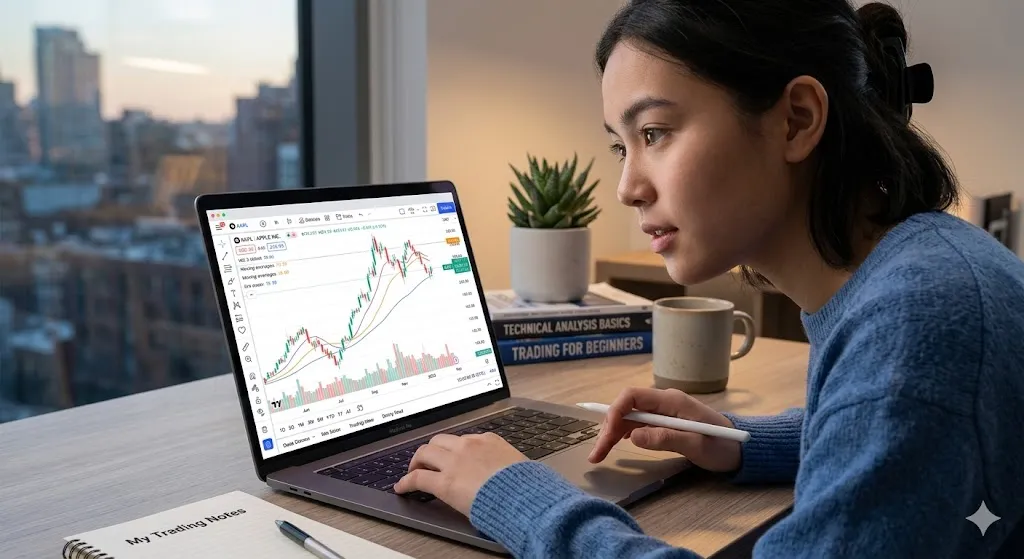
TradingView review for beginners: what it does well
TradingView is best known for charts, and that is where it earns its reputation. The platform gives you interactive price charts that are easy to resize, customize, and compare. Even if you know very little about technical analysis, the visual side is approachable. You can switch from candles to lines, add indicators with a few clicks, and save your layouts without needing advanced software knowledge.
That ease of use is one of its biggest strengths. A lot of trading platforms were built with professionals in mind first and everyone else second. TradingView feels more modern. It runs in the browser, works well on mobile, and does not force beginners into a clunky desktop setup just to check a chart.
Another win is market coverage. If you want to watch Bitcoin, Tesla, gold, the S&P 500, or major forex pairs, you can usually do it from one place. For beginners, that matters because it reduces friction. Instead of bouncing between several websites, you can learn chart basics on one platform.
The community side is also unusual. Users publish chart ideas, market opinions, and scripts. That can be useful when you want to see how experienced traders think. It can also be risky if you mistake public opinions for reliable signals. TradingView gives you access to ideas, not guaranteed good ones.
🟢 Pros
- Excellent charts: Intuitive, modern design that is easy to customize.
- Free plan available: Great for testing the platform without upfront costs.
- Mobile and web access: Works smoothly in browsers and on mobile apps.
- Supports multiple markets: Track crypto, stocks, forex, and indices in one place.
- Powerful alerts: Set notifications for price levels and trendlines to avoid emotional trading.
🔴 Cons
- Learning curve: Advanced tools and charts can feel like a cockpit at first.
- Paid data feeds: Some specific real-time exchange data requires extra payment.
- Feature overwhelm: Too many indicators can confuse beginners into bad habits.
- Mixed social quality: Community ideas vary heavily in accuracy and value.
- Pricey upgrades: Premium features and plans can become expensive quickly.
Is TradingView easy for first-time users?
Yes, mostly. But the honest answer is that it depends on what you are trying to do.
If your goal is simple chart reading, basic watchlists, and price alerts, TradingView is easier than many traditional broker platforms. The design is cleaner, the charting tools are strong, and the learning curve is reasonable. You can be productive fairly quickly.
If your goal is to learn active day trading in a week, it will still feel overwhelming. That is not really TradingView’s fault. Trading itself has a steep learning curve, and no platform can remove that. What TradingView can do is make the visual part of learning less painful.
Beginners usually struggle with one specific issue here: too much choice. There are dozens of indicators, drawing tools, timeframes, scripts, and social ideas to explore. That sounds exciting, but it can lead to confusion. New users often end up adding five indicators to a chart and understanding none of them.
A better beginner approach is simple. Start with price, volume, one or two timeframes, and maybe one basic indicator such as moving averages or RSI. TradingView supports advanced setups, but you do not need to use everything just because it is available.
The Beginner’s TradingView Trap: Why Most New Users Get Overwhelmed
After watching beginners use TradingView, a pattern appears. Most people do not struggle because the platform is difficult. They struggle because they try to use too much of it at once.
A typical new user opens a chart, adds RSI, MACD, Bollinger Bands, moving averages, volume indicators, and then follows several traders in the community section. Within a few days, the chart becomes cluttered and every indicator seems to send a different signal.
At Quotela, we call this the Beginner’s TradingView Trap. The platform gives you powerful tools, but beginners often mistake more information for better decision-making.
A cleaner approach works better. Start with price action, volume, and one indicator you understand. Add complexity only after you can explain why you need it. Most successful traders build their systems gradually rather than all at once.
The 15-Minute TradingView Setup for Beginners
If you are opening TradingView for the first time, resist the urge to customize everything.
A simple beginner setup can be created in about 15 minutes:
- Create a watchlist with 5–10 assets.
- Choose one chart type, preferably candlesticks.
- Add volume below the chart.
- Add a single moving average.
- Create one price alert.
- Save the layout.
That setup is enough to learn chart behavior without getting distracted by advanced tools. Many beginners spend hours configuring charts before they understand what they are looking at. A simple setup creates a better learning environment and makes it easier to develop consistent habits.
Pricing: free vs paid plans
One reason TradingView attracts so many new users is the free plan. For beginners, that is a big advantage. You can test the platform, build watchlists, use charts, and get a feel for the interface without paying upfront.
The free version is good enough for many casual users, especially if you are investing long term or learning chart basics. If you mainly want to monitor markets, mark support and resistance, and set up a basic routine, you may not need more right away.
Paid plans start to matter when you want extra indicators on one chart, more alerts, more saved layouts, or fewer restrictions. Active traders often upgrade because alerts become more important and chart customization becomes part of their workflow.
For a true beginner, the trade-off is simple. The free tier is excellent for learning, but serious short-term traders may outgrow it. If you are still figuring out whether trading suits you, paying too early is usually unnecessary.
The best features for beginners
The charting experience is still the headline feature. Drawing trendlines, marking zones, and switching between timeframes feels intuitive. It is one of the few platforms where beginners can start experimenting visually without feeling buried by old-fashioned design.
Alerts are another standout. You can set alerts on price levels, trendlines, and in some cases indicator conditions. That is genuinely useful for people who do not want to stare at charts all day. Instead of reacting emotionally to every market move, you can let the platform notify you when something important happens.
Watchlists are simple but powerful. A beginner can track a small set of assets and build a habit around observation rather than impulsive trading. This sounds basic, but it matters. Many early mistakes come from trying to monitor too many markets at once.
The replay feature can also help learning. It lets you go back in time and watch price action unfold as if it were live. That makes it easier to practice reading charts without real money on the line. For beginners, that kind of practice is more valuable than chasing someone else’s hot take online.
| Category | Rating |
|---|---|
| Ease of Use | 8/10 |
| Charting Tools | 10/10 |
| Learning Curve | 7/10 |
| Free Features | 9/10 |
| Mobile Experience | 9/10 |
| Overall Beginner Score | 8.5/10 |
Where TradingView can frustrate beginners
No platform is perfect, and this one has a few weak spots for newer users.
First, not all data is equal. Depending on the market, exchange, and plan, you may need additional subscriptions for real-time data. This catches some beginners off guard. They assume the platform includes everything by default, then realize certain feeds require extra payment.
Second, the social content is mixed in quality. You will find smart analysis, but also overconfident predictions and chart spam. If you are new, it is easy to confuse popularity with accuracy. Treat community ideas as educational material, not instructions.
Third, TradingView is a charting platform first, not always a complete trading solution. Some users can connect brokers and place trades through it, but the experience depends on where you live and which broker you use. If you expect one app to handle every part of your trading life, check compatibility first.
Finally, advanced tools can tempt beginners into complexity for its own sake. More indicators do not guarantee better decisions. In fact, they often create hesitation and conflicting signals.
The Quotela TradingView Readiness Test
Before paying for a TradingView subscription, ask yourself these three questions:
- Have I reached the limit of the free plan?
- Do I regularly use the alerts I already have?
- Can I explain why I need additional indicators or layouts?
If the answer to any of these questions is no, the free version is probably still enough.
Many beginners upgrade because they think premium features will improve their results. In reality, successful trading usually comes from better decisions, not more tools. TradingView’s paid plans become valuable when they solve a specific problem in your workflow, not when they simply add more options.
The goal is not to own every feature. The goal is to build a process you can actually follow.
TradingView review for beginners: who should use it?
TradingView is a strong fit for beginners who want to learn market structure, technical analysis basics, and chart-based decision making. It works especially well for visual learners who want one place to track different asset classes.
It is also a good option if you are not ready to commit heavily yet. The free plan gives you enough room to explore before spending money, which lowers the pressure. That makes it appealing for new crypto traders, stock market learners, and curious investors who want better charts than their broker provides.
It may be less ideal if you want a simple investing app with almost no learning curve. If your main goal is buying index funds and checking them occasionally, TradingView may be more platform than you need. It can still be useful, but it is not the easiest route for completely passive investors.
TradingView vs MetaTrader
MetaTrader has long been a favorite among forex traders, particularly those who rely on automated trading strategies and Expert Advisors (EAs). It offers deep customization and broker integration, but its interface can feel dated and intimidating for beginners.
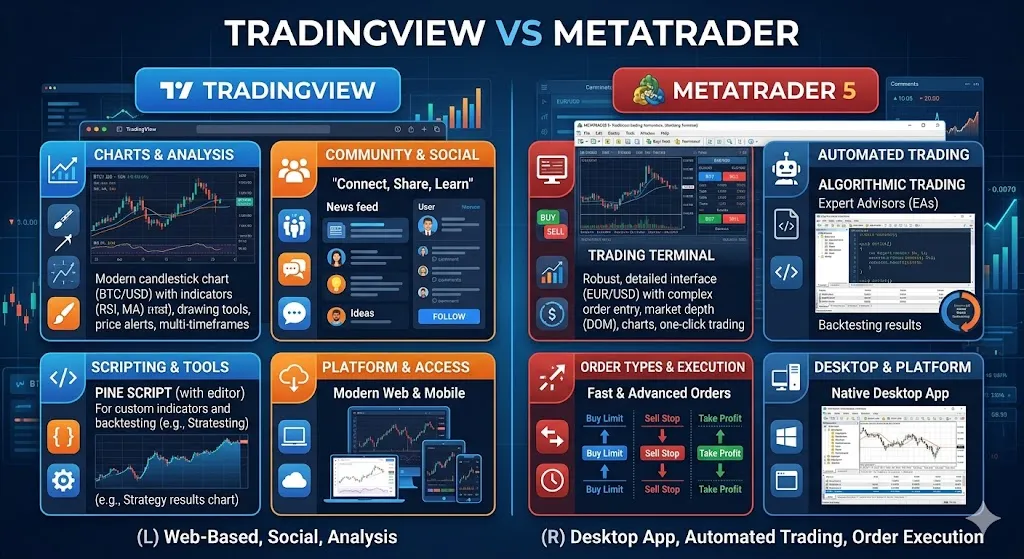
TradingView, by contrast, focuses on accessibility and visual charting. Its browser-based platform, modern design, and intuitive tools make it easier for new traders to learn technical analysis without installing software.
For beginners who want clean charts and a smoother learning experience, TradingView is often the more approachable option, while MetaTrader may appeal more to advanced traders seeking automation and algorithmic trading capabilities.
TradingView vs Investing.com
Both TradingView and Investing.com provide market data, charts, and financial news, but they serve slightly different purposes. Investing.com functions primarily as a financial information portal, offering economic calendars, news coverage, earnings updates, and market analysis. TradingView places much greater emphasis on charting and technical analysis.
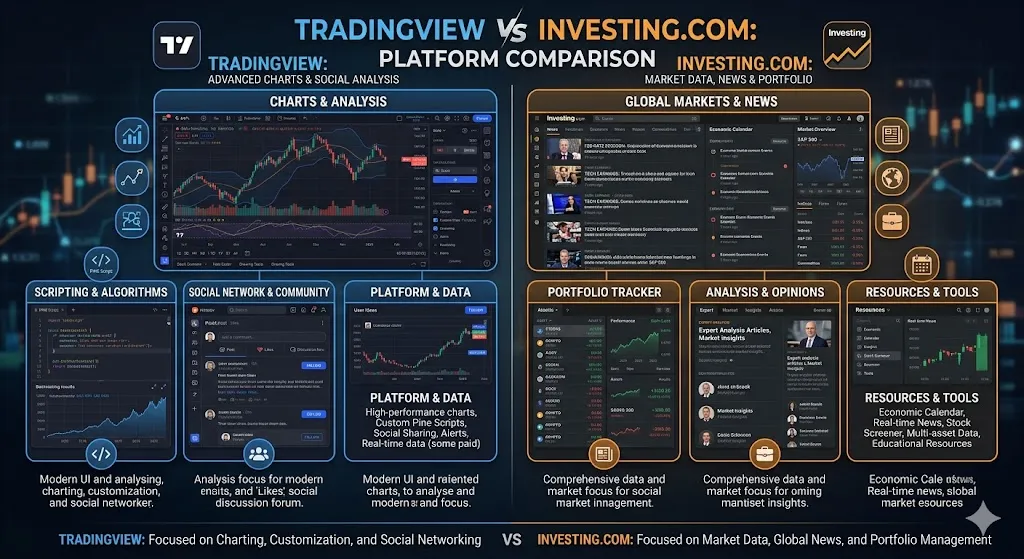
While Investing.com is excellent for staying informed about market events, TradingView offers a superior experience for users who want to analyze price action, create watchlists, set alerts, and study charts in detail. Many investors actually use both platforms together—Investing.com for news and TradingView for chart analysis.
TradingView vs Webull Charts
Webull provides charting tools directly within its brokerage platform, making it convenient for users who already trade through the app. However, TradingView generally offers more advanced chart customization, a larger selection of indicators, better drawing tools, and a stronger charting experience overall.
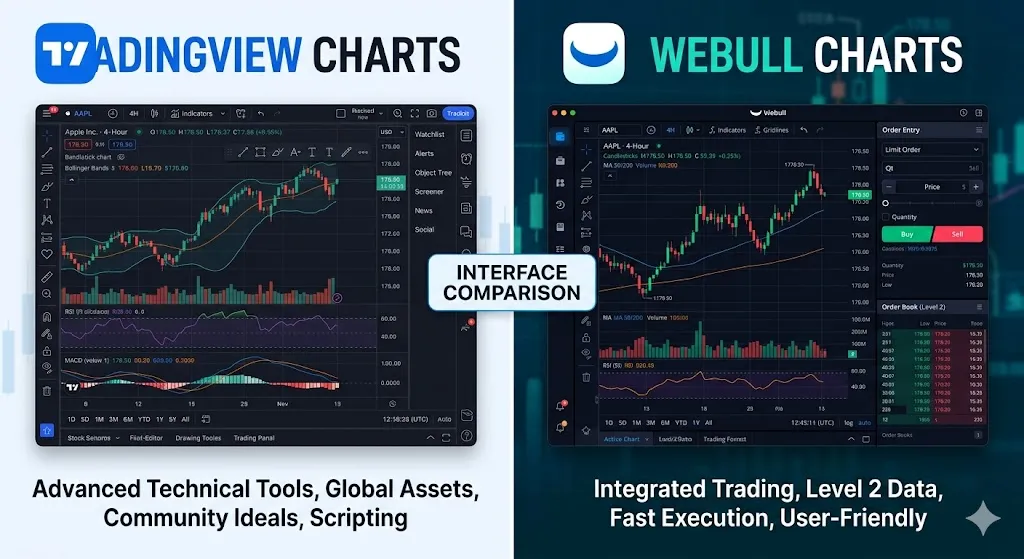
Webull’s charts are sufficient for casual investors and active traders who prioritize convenience, but TradingView is often preferred by users who spend significant time analyzing market trends.
For beginners, Webull may be simpler if they only need basic charting and trading in one place, while TradingView is better suited for those who want to develop stronger technical analysis skills over time.
Trading Platforms Comparison
| Feature | TradingView | MetaTrader | Investing.com | Webull |
|---|---|---|---|---|
| Charts | Excellent | Good | Basic | Good |
| Alerts | Excellent | Good | Limited | Good |
| Mobile Experience | Excellent | Average | Good | Excellent |
| Learning Curve | Moderate | High | Easy | Easy |
| Best For | Analysis | Forex Trading | News | Trading |
How a New Investor Used TradingView to Build Better Market Habits
A beginner investor started using TradingView to monitor a small watchlist of ETFs and large-cap stocks. By relying on price alerts instead of constantly checking the market, they reduced emotional trading decisions and developed a more disciplined investing routine. After several months, TradingView became less of a trading platform and more of a structured learning environment that helped them understand market behavior.
A smart beginner setup on TradingView
If you decide to try it, keep your setup lean. Create one watchlist with a handful of assets you actually care about. Use a clean chart layout with price, volume, and perhaps one indicator. Set a few alerts around key levels instead of checking charts every ten minutes.
That one change can improve your learning experience a lot. Trading works better when your process is calm and repeatable. TradingView gives you plenty of room to build that process, but it will not build it for you.
At Quotela-style practicality, the best advice here is simple: use the platform as a tool for clarity, not as a shortcut to certainty. TradingView can help you become more organized, more observant, and less reactive. For a beginner, that is already a meaningful edge.
If you are choosing between using TradingView or avoiding charts altogether, TradingView is one of the better places to start. Just do yourself a favor and begin with the basics. The traders who last are usually not the ones with the busiest screens, but the ones who learn to read the market without turning every chart into noise.
FAQ
Is TradingView free for beginners?
Can beginners trade directly on TradingView?
Is TradingView good for stocks?
Is TradingView worth paying for?
About the Author
Ana Milojevik is a writer and contributor at Quotela.net, a general-interest publication covering business, health, technology, travel, personal development, quotes, and digital trends. She enjoys researching practical topics and creating informative content that helps readers discover new ideas, insights, and useful perspectives.